Skip to content

Coworking software and CRM, built for IndiaRun one centre or many from one place.

Easy for members, calmer for your team, and billing that adds up. From one centre to a whole network.

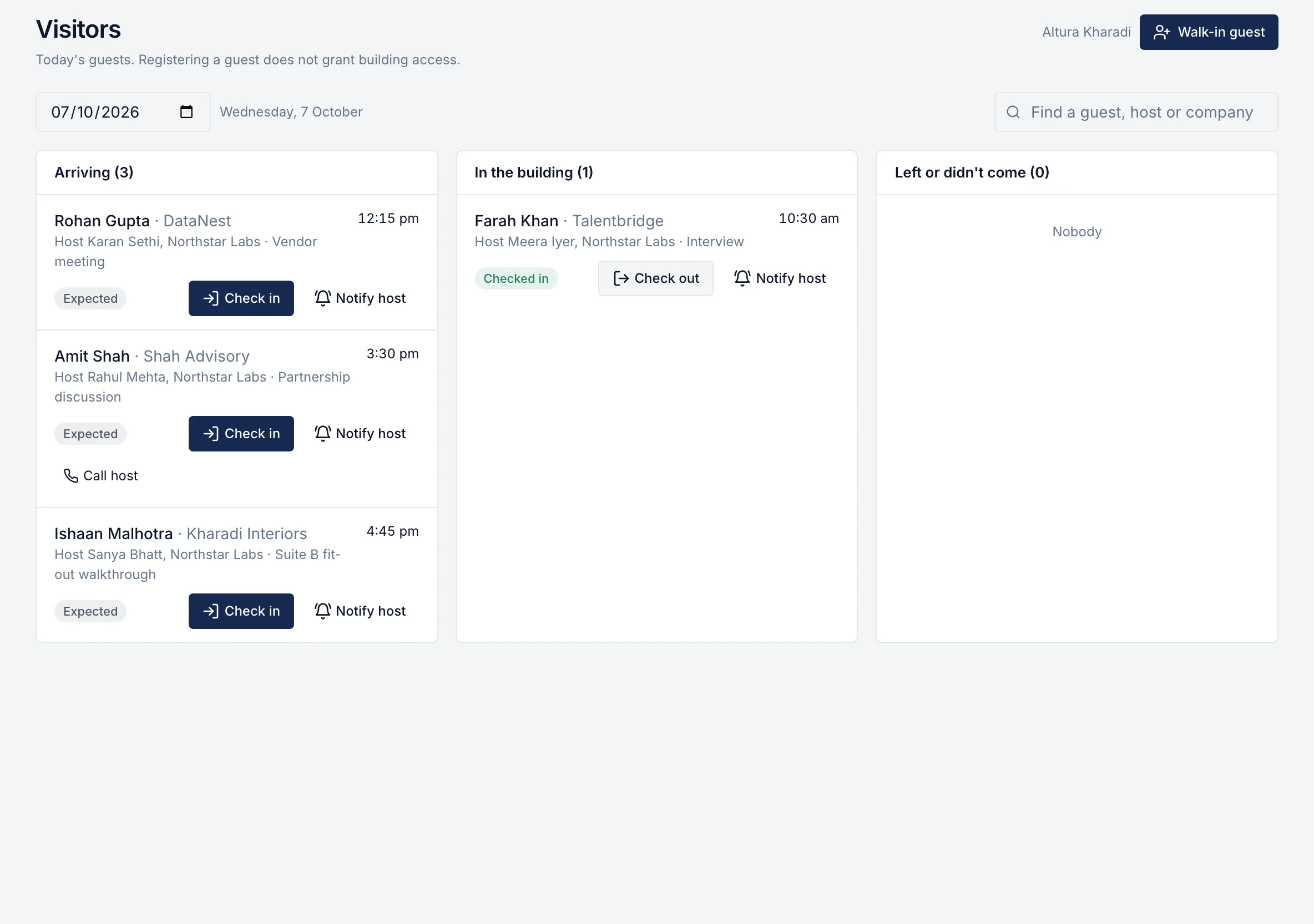
Reception desk: guests arriving, in the building and done, with check-in buttons
app.rivonos.com
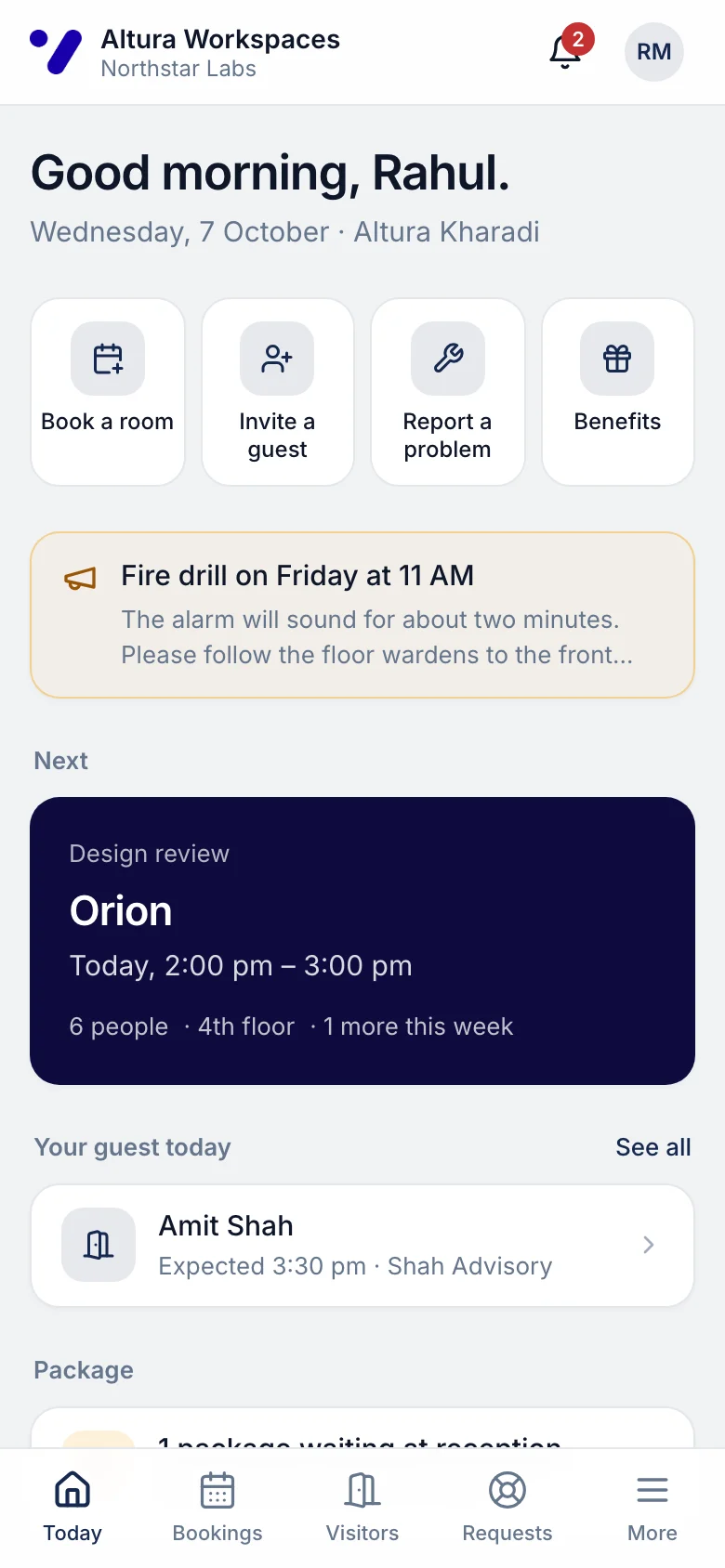
Rahul's Today page on a phone: next meeting in Orion at 2 pm, a guest at 3:30 pm and quick actions

What coworking operators use rivonOS for.

Three groups of people, one platform: your members, the team at each centre, and the business behind them.

Members

Bookings with included hours, guests, help with ratings, benefits, events and parcels, on any device.

Member experience

The front desk

Guests, parcels, room board, request queues, announcements and new members, on one screen.

Community operations

The business

Enquiries, live availability, quotes for company clients, agreements, GST invoices, collections and renewals.

Sales, contracts and billing

From a room booking to the monthly MIS, on one record.

Most centres run this on WhatsApp groups, spreadsheets and an accounting package. In rivonOS each step hands over to the next without retyping.

  1. A member books a room and invites a guest

    From their phone, with nothing to install. Included hours are used first, and the guest is on reception's list before they arrive.
  2. The centre team runs the day from one screen

    Guests, room bookings, requests with deadlines, parcels and events appear on Today, in order of what needs attention.
  3. A member's company asks for more seats

    The requirement goes to sales with live availability across your centres, so the first offer is one you can keep.
  4. The deal is priced, approved and signed

    Quotes use your price books, discounts go to the right approver, and the agreement carries the approved terms forward.
  5. Invoices go out every month, correctly

    GST tax invoices are drafted from the agreement and checked against the client's purchase order. Payments are recorded with TDS.
  6. You see every centre on one screen

    Occupancy, revenue, dues, renewals and revenue at risk, from the portfolio down to a single client.

What each part looks like.

Centre operations

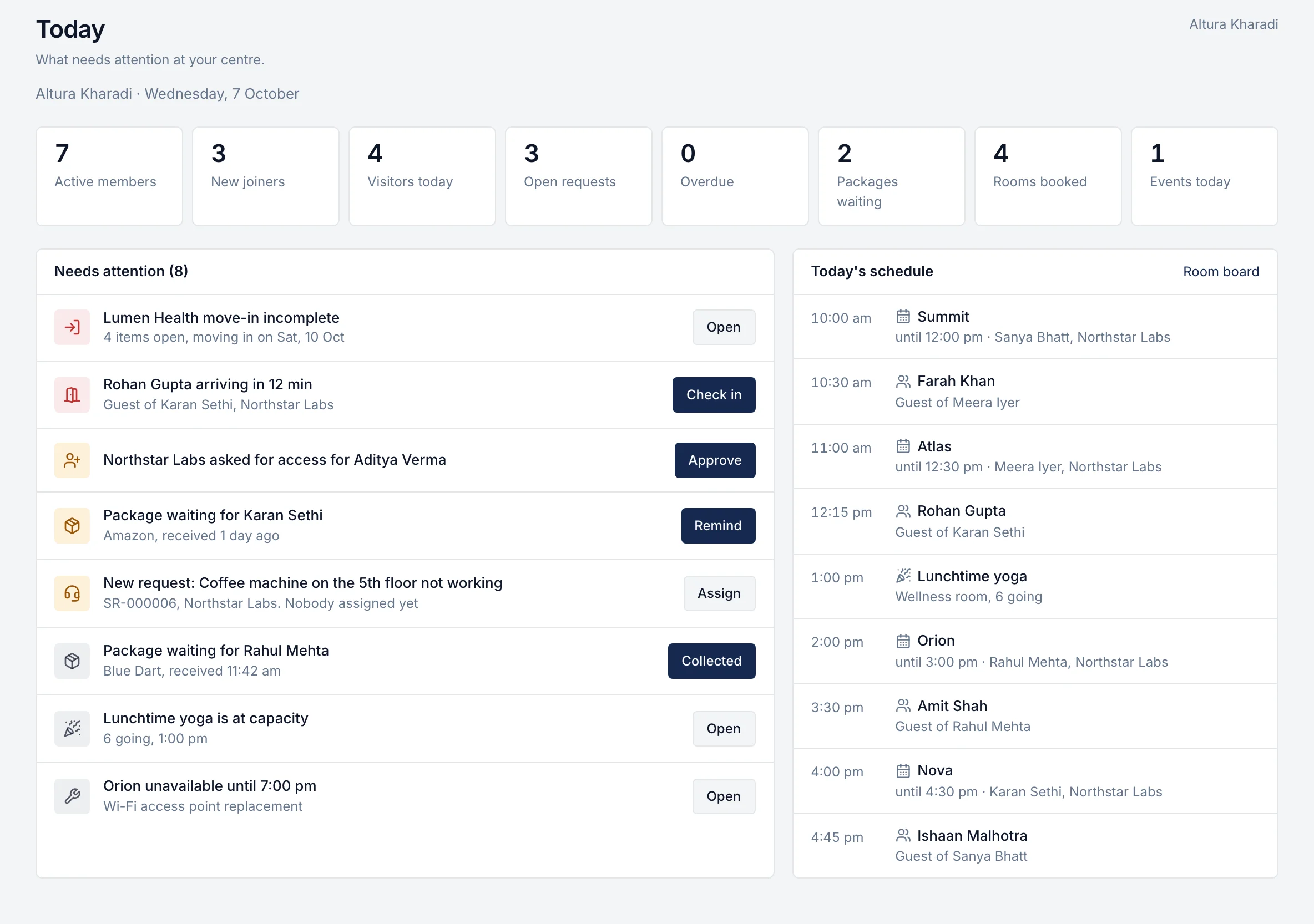
Every centre team works from the same Today screen.

Guests arriving, rooms booked, requests due and parcels waiting, in order of urgency, each with the button that deals with it.
  • Request deadlines set by category and urgency
  • Members rate every fix
  • Move-in and move-out checklists for each client
Community manager's Today: counts, an action feed with one-tap actions and the day's schedule

Sales and availability

Ready when a company wants 30 seats.

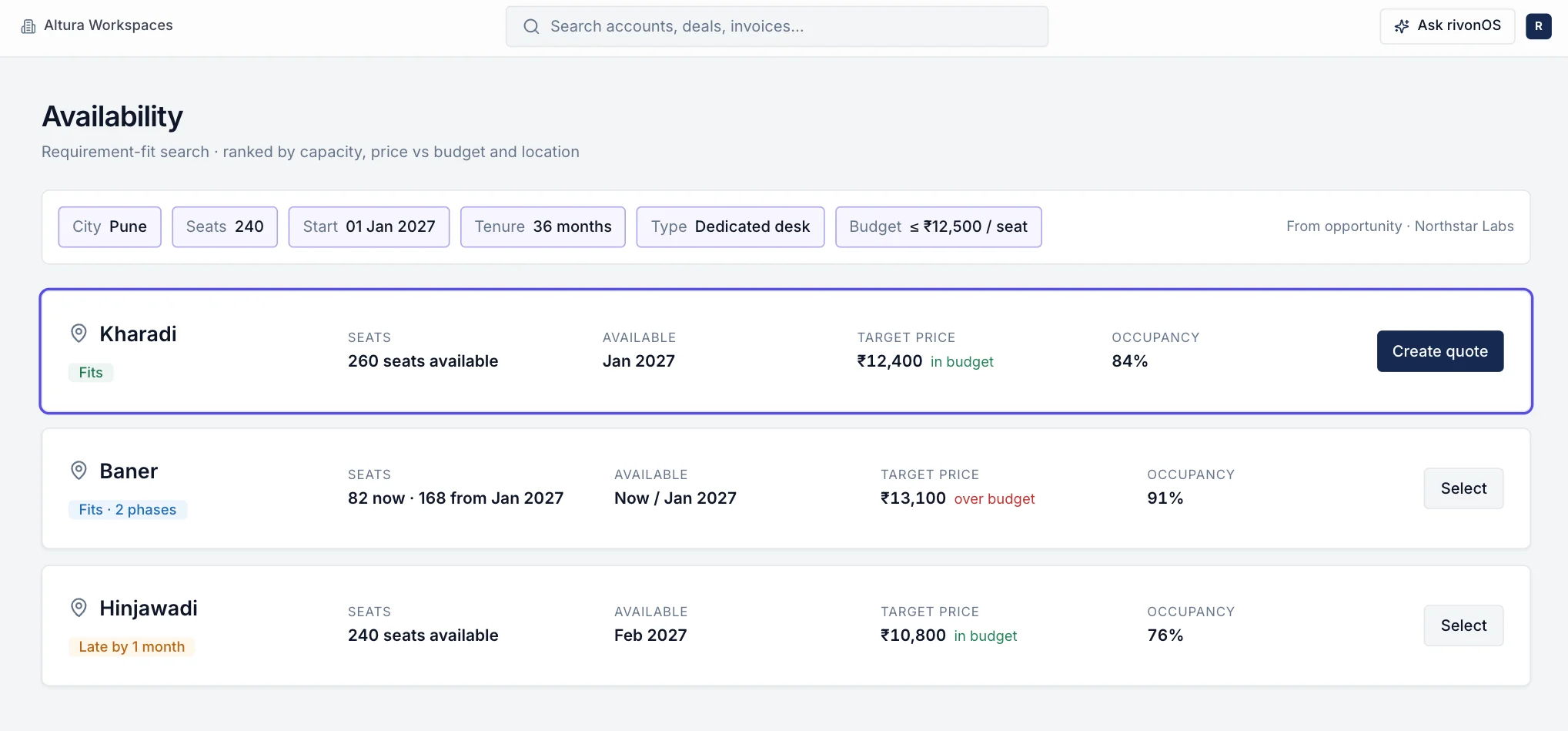
Coworking members turn into company clients. When one asks for a private office or a floor, rivonOS already has the requirement, availability, quote, approval and agreement to win it properly.
  • Availability ranked across centres
  • Price books and discount approvals
  • Agreements that carry the approved terms
For managed office operators
Availability search ranking Kharadi, Baner and Hinjawadi against the requirement

GST billing and collections

Invoices that match the agreement and the PO.

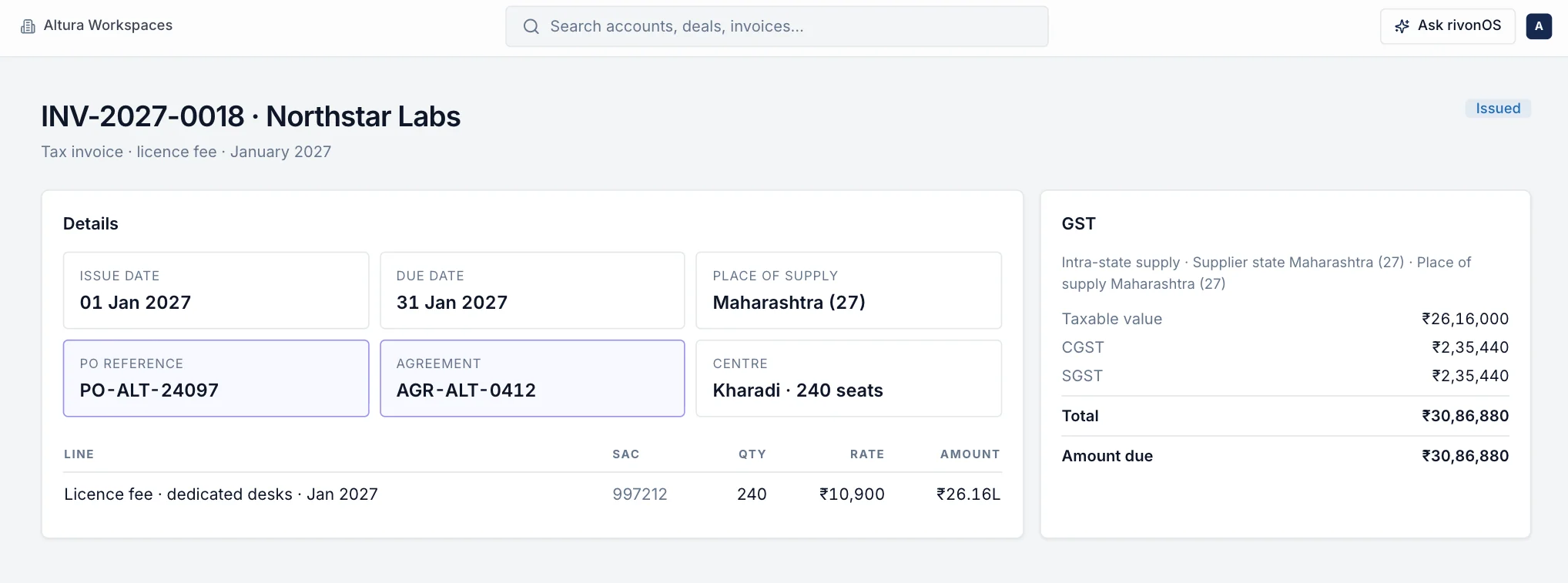
Monthly GST tax invoices are drafted from the agreement, billed from the centre's state and checked against the client's purchase order before they go out.
  • Credit and debit notes linked to the invoice
  • Payments recorded with TDS
  • Receivables and follow-ups by client
GST tax invoice INV-2027-0018 with CGST, SGST, place of supply and PO reference

Control tower

Every centre's numbers, without asking for a report.

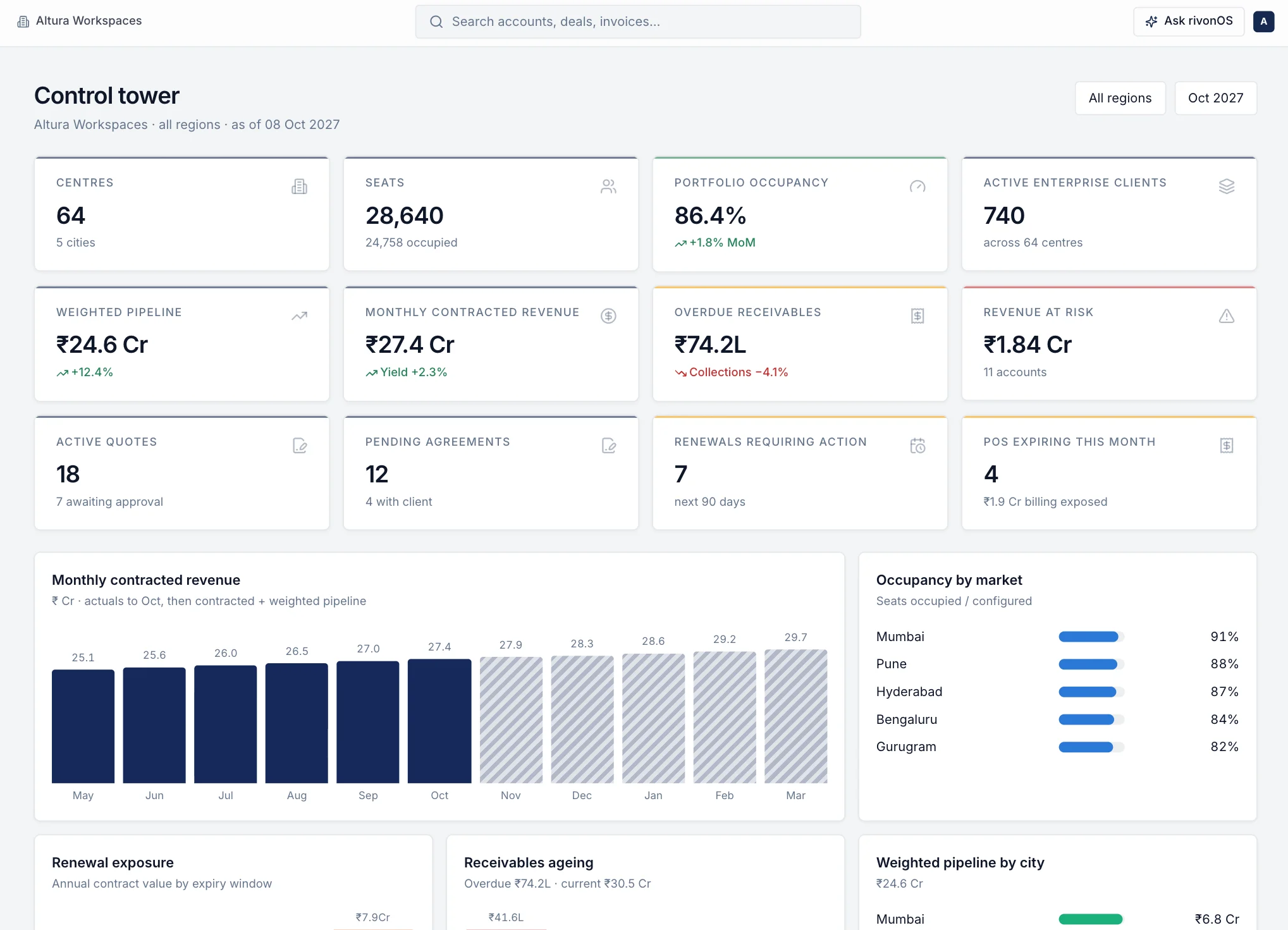
Occupancy, contracted revenue, dues, renewals coming up and revenue at risk, for the portfolio and for each centre, with a monthly MIS pack.
rivonOS control tower: centres, seats, occupancy, pipeline, contracted revenue, overdue receivables and revenue at risk

Leads and pipeline: a coworking CRM

Coworking members turn into company clients, and companies ask for quotes. rivonOS keeps sales on the same record as the members and the invoices, so nothing is copied from one tool to another.

  • Leads

    Every enquiry is a lead with its source, including brokers. New leads are checked against existing ones, so two people don't chase the same company.

  • Requirements

    Seats, city, preferred areas, start date, tenure and budget. Every revision is kept, so you know which version a quote answered.

  • Site visits

    Book the visit from the opportunity and rivonOS sends a reminder before it. Calls, meetings and tasks sit on the same record.

  • Availability search

    One search across every centre, ranked against the requirement, including seats that free up later.

  • Quotes

    Built from your price books, with the monthly charge, GST, deposit and contract value worked out, and sent as a PDF.

  • Approvals

    Discounts go to the right approver before the client sees the price. Nobody approves their own discount.

See how leads, requirements and live inventory work in sales and availability, and how price books, quotes and discount sign-off work in pricing and approvals.

Built for operators running more than one centre.

The same platform works for a single centre, but most of its design is about keeping several centres on one standard.

  • One way of working in every centre

    Requests, visitors, parcels, bookings and move-ins follow the same process wherever a team sits, so a new centre runs like the others from its first day.

  • Teams see only their centres

    A community manager sees one centre, a city lead a city, a regional head a region. Finance and leadership see everything.

  • GST from the right state

    Each centre bills from its own GSTIN and state, and place of supply decides CGST and SGST or IGST on every invoice.

  • Benefits across your network

    Members can use benefits at their own centre or across the network, with allowances that count themselves.

  • A new centre in days, not weeks

    Add the centre, its floors, rooms and spaces, publish the centre guide and assign the team. We help you load it from your files.

  • Inventory you can sell across centres

    Sales searches every centre at once for seats, cabins and floors, including space that frees up later.

What rivonOS replaces in a typical centre.

Most operators we speak to run on a mix of chat groups, registers and spreadsheets. Each one works on its own; the trouble is in the handovers between them.

  • WhatsApp groups for room bookings

    The member app and the room board. No double bookings, and included hours are counted for you.

  • A paper visitor register

    The visitor desk. Guests are invited in advance and the host is told on arrival.

  • Requests chased by phone

    Request queues with deadlines and ratings, centre by centre.

  • Billing in a spreadsheet

    GST invoices drafted from each agreement, checked against the PO, with TDS recorded on payment.

  • Renewals in someone's inbox

    Renewals flagged months ahead, with the reasons a client might leave.

  • Month-end reports built by hand

    The control tower and the MIS pack, ready when you need them.

  • An occupancy forecast in a spreadsheet

    Forward occupancy from signed agreements, renewals and pipeline, by week or month ahead.

  • Purchases approved on chat

    Purchase requests, approvals and purchase orders, with GST worked out for you.

  • Vendor bills paid on trust

    Bills checked against the order and what arrived, before anyone approves them.

Questions coworking operators ask

What is coworking software?
Software that runs a shared workspace day to day: members, room bookings, guests, service requests and billing. rivonOS also covers the business side for operators, from the first enquiry to the GST invoice and the payment, across every centre.
Does rivonOS include a coworking CRM?
Yes. Leads, requirements, site visits, availability search across centres, quotes from your price books and discount approvals are live today, in the Sales and pricing pack. The lead, the quote and the agreement stay on one client record, next to that company's members and invoices.
How is coworking space management software for operators different from a booking app?
A booking app looks after rooms and desks. An operator also sells to companies, signs agreements, raises GST invoices from each centre's state and follows up on payments. rivonOS keeps all of that on the same record as the members and the centre team's day.
Can we keep our accounting software?
Yes. rivonOS drafts GST invoices from the agreement and records payments with TDS; your accounting software stays your ledger. Direct connections to Tally and Zoho Books are coming soon, so today finance posts them from the invoice PDFs. Reports export to CSV (opens in Excel); a Tally-ready invoice export is planned.
We have one centre and about 100 seats. Is rivonOS too big for us?
No. Start with the member app and the centre team's console. Sales, agreements and GST billing are there when a company asks for 30 seats, and you pay only for the packs you use.
We run several centres in different cities. How does access work?
Every user is given centres, a city or a region. A community manager sees only their centre; leadership and finance can see all of them. Changes to prices, invoices and policies can require a second person.
Do you handle GST invoices?
Yes. rivonOS issues GST tax invoices and credit and debit notes under CGST Rules 46 and 53, drafted from the agreement and billed from each centre's state, and records payments with TDS.
Can we manage our own vendors and purchases?
Yes. The Vendors and procurement pack covers vendors, purchase requests and orders, goods receipts and service confirmations, vendor bills checked against both, payables and spend reports. Payments are made from your bank and recorded in rivonOS.
Can members pay for bookings by card?
Coming soon. Online payments through Razorpay are in development. Today, bookings use included hours, and time beyond them is recorded for the company's invoice.
How is rivonOS priced for operators?
Per centre per month, with Core plus the packs you need and no per-user fees. Centres that are not open yet are free for up to 90 days. See the pricing page for current figures.
How long does it take to start?
We set rivonOS up from your existing files: centres, rooms, clients and members. On the demo call we agree which centres go first and a start date.
See how rivonOS would work across your centres.

One hour with the people who built it, using your own centres. If rivonOS isn't the right fit, we'll tell you.