See rivonOS from every side.
One day at Altura Workspaces, seen by a member, the centre team and the business.
The full product tour
Ten minutes, in 15 chapters: the member app, the centre team’s day, sales, pricing, contracts, GST billing, reports, set-up, and the choice of how your data is hosted.
Captions on by default. Real rivonOS screens with illustrative data: Altura Workspaces and its clients are fictional.
Members: Rahul at Northstar Labs
Real screens from the member app.
- app.rivonos.com
1
Today
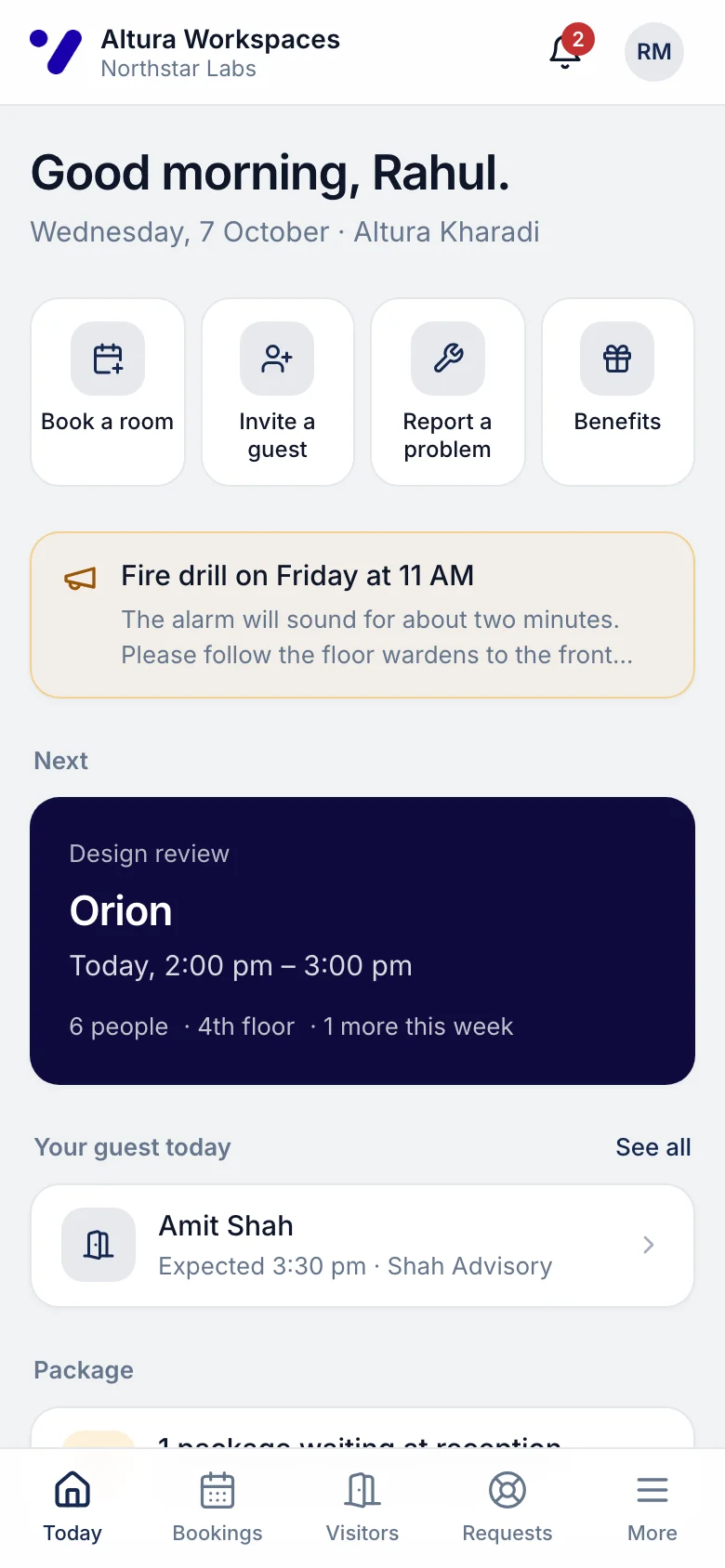
The next meeting, a guest, a parcel and a benefit.
- app.rivonos.com
2
Book a room
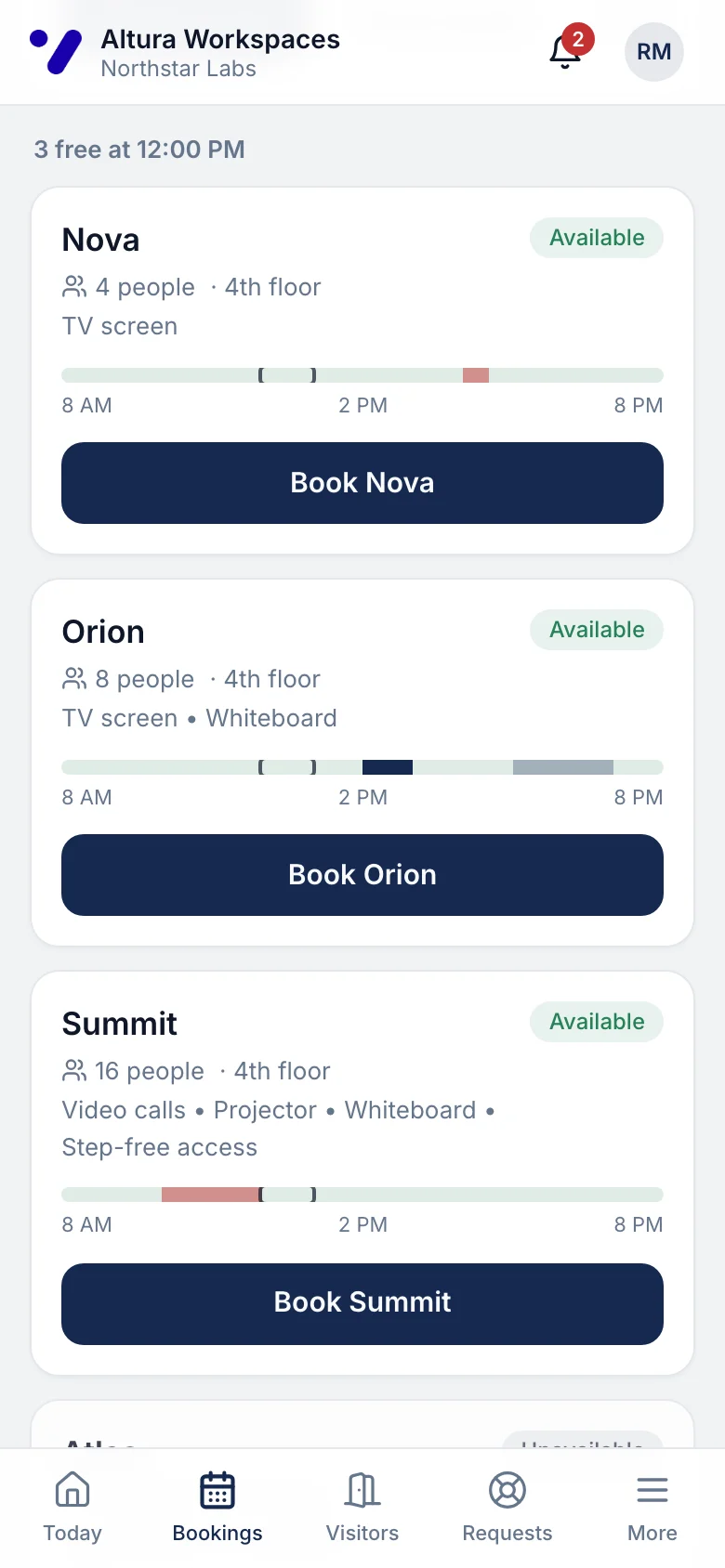
Free rooms right now, with capacity and equipment.
- app.rivonos.com
3
Invite a guest
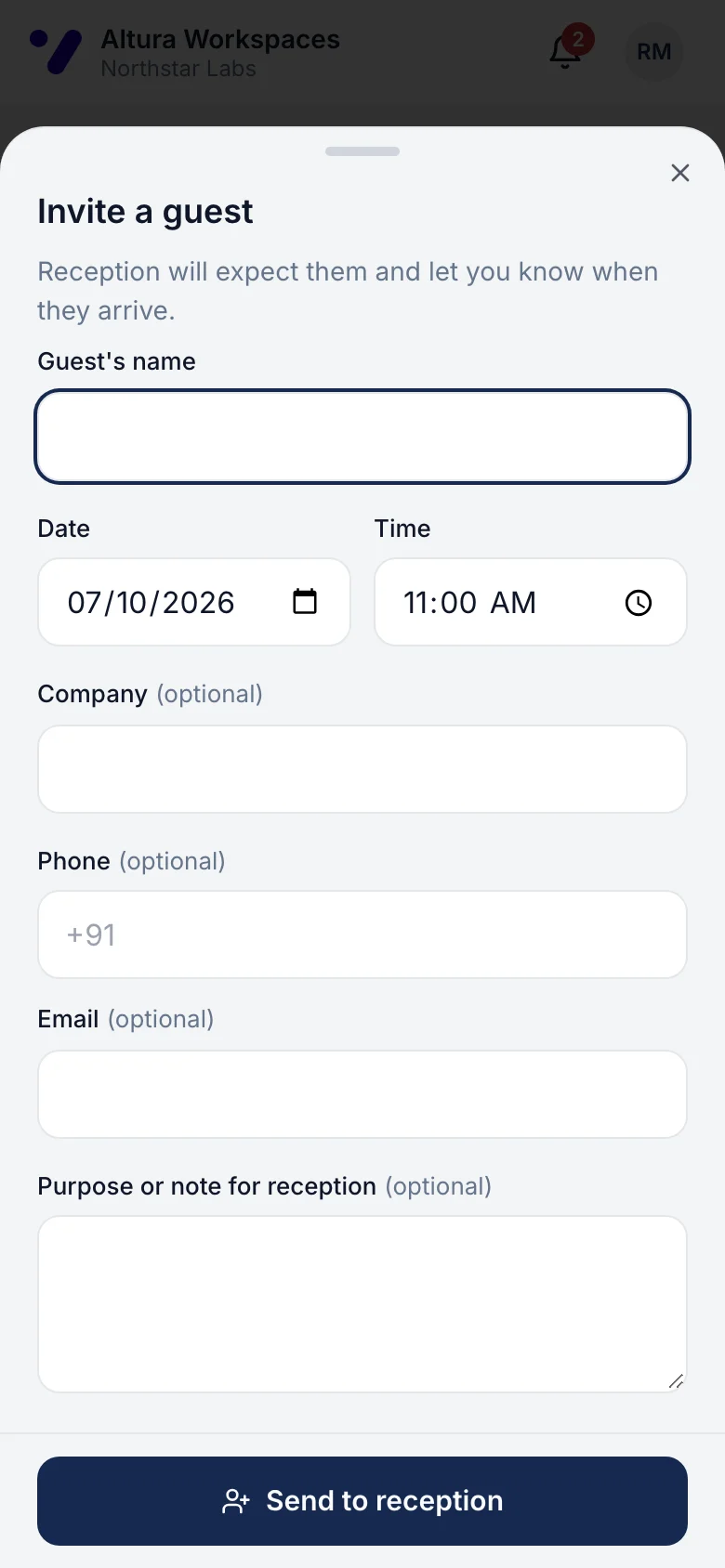
Name, time and company; reception is ready.
- app.rivonos.com
4
Follow a request
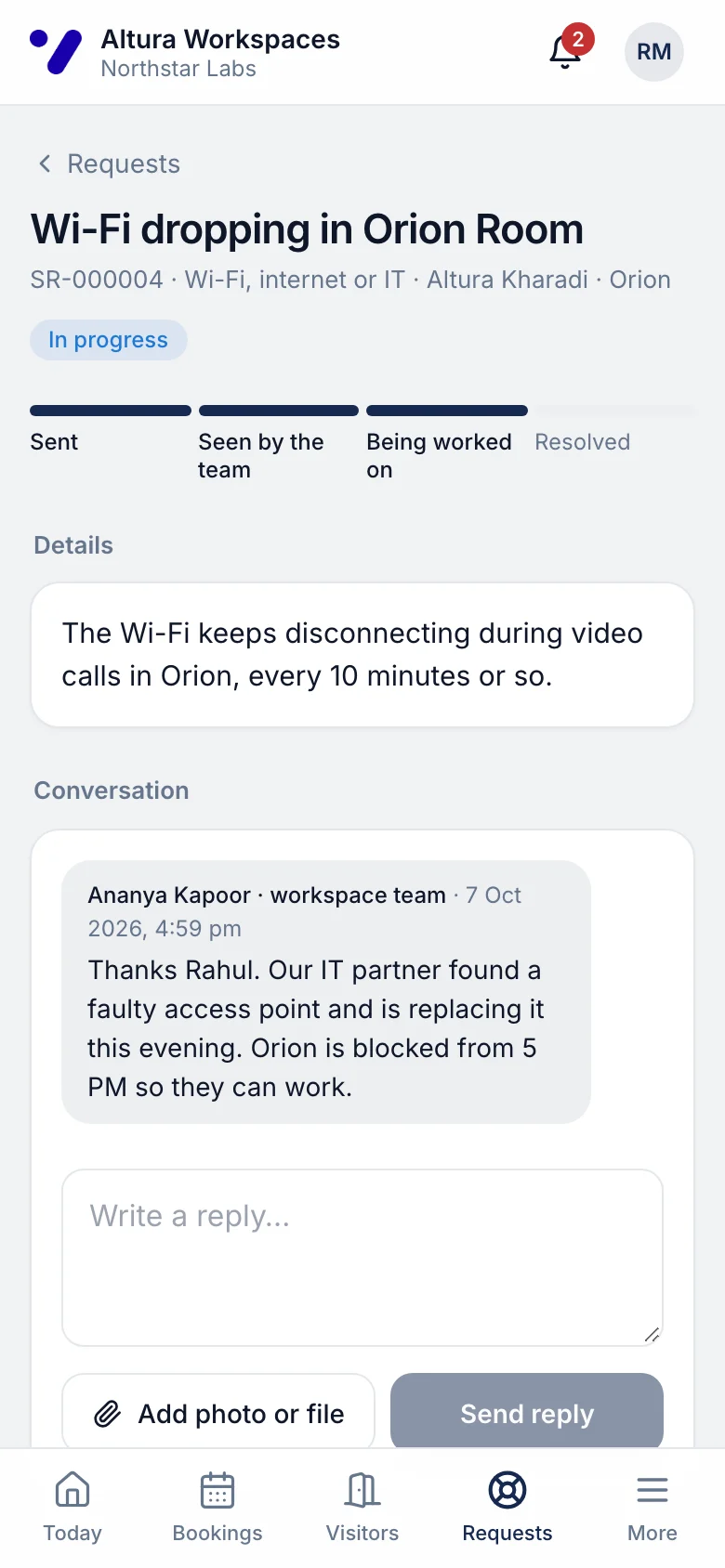
Wi-Fi in Orion: progress and the team's reply.
- app.rivonos.com
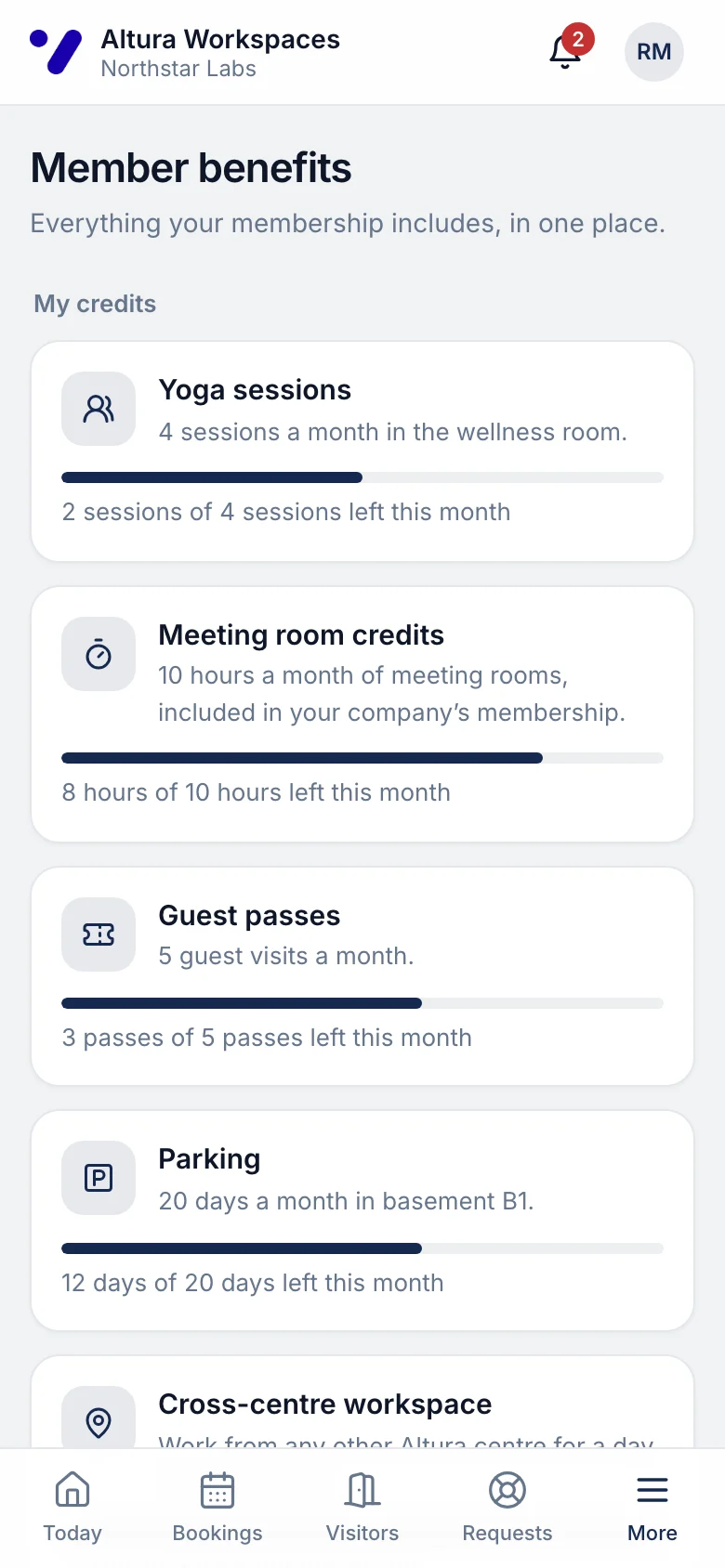
5
Benefits
Hours, sessions, passes and parking days left.
Centre team: Ananya at Altura Kharadi
The same day, from the centre team’s console.
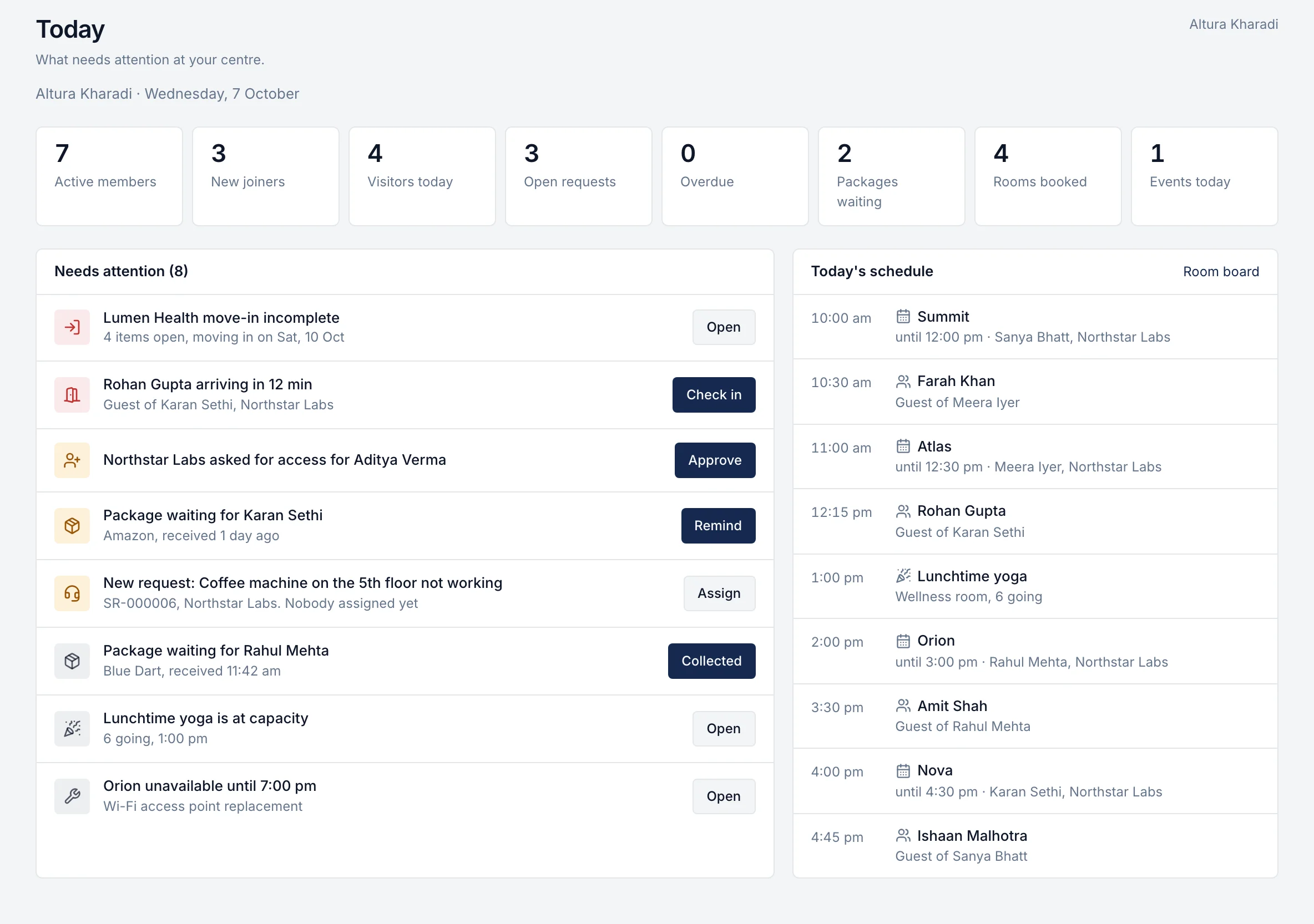
1
Today
Ananya's action feed and the day's schedule.
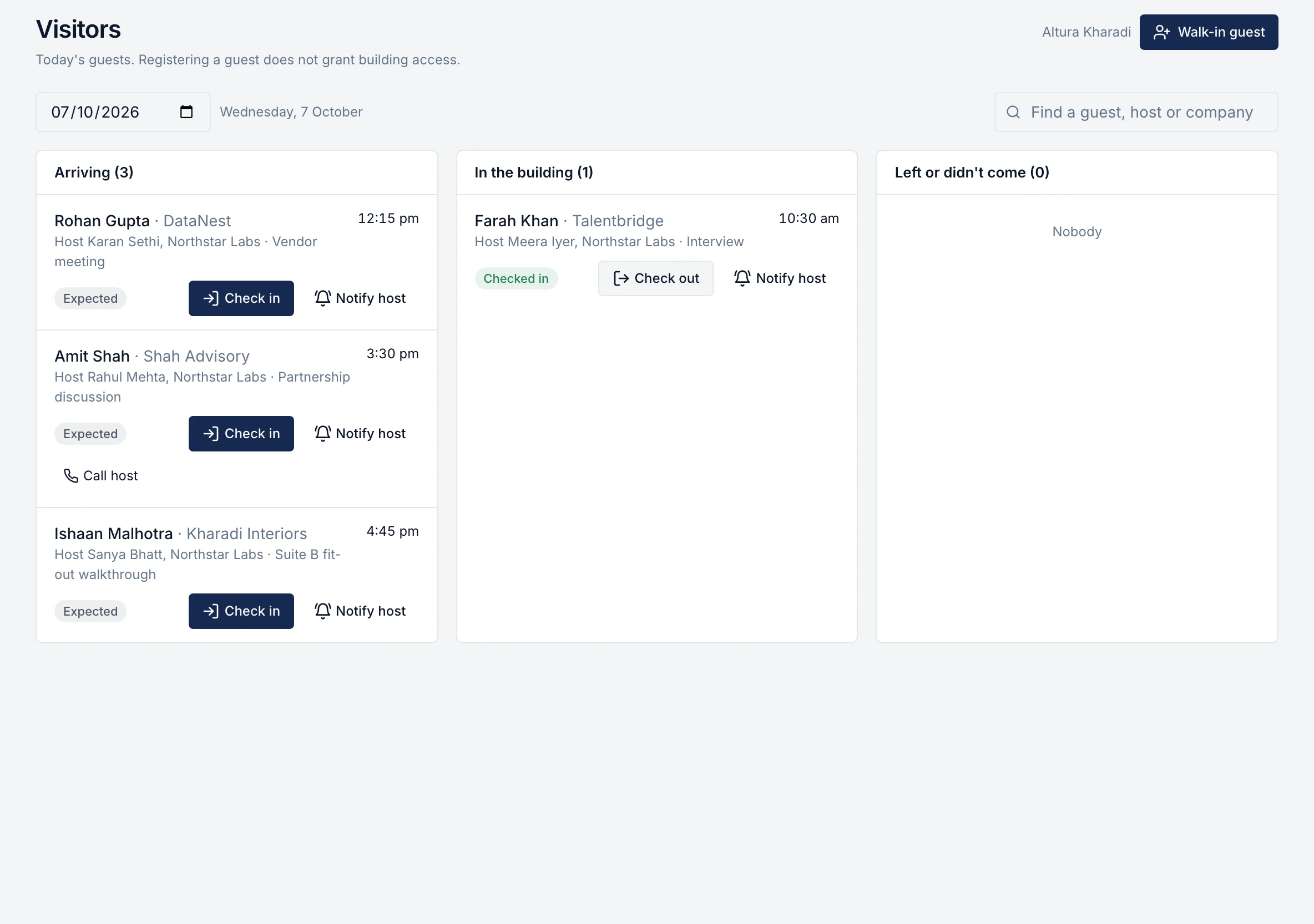
2
Visitor desk
Arriving, in the building, done.
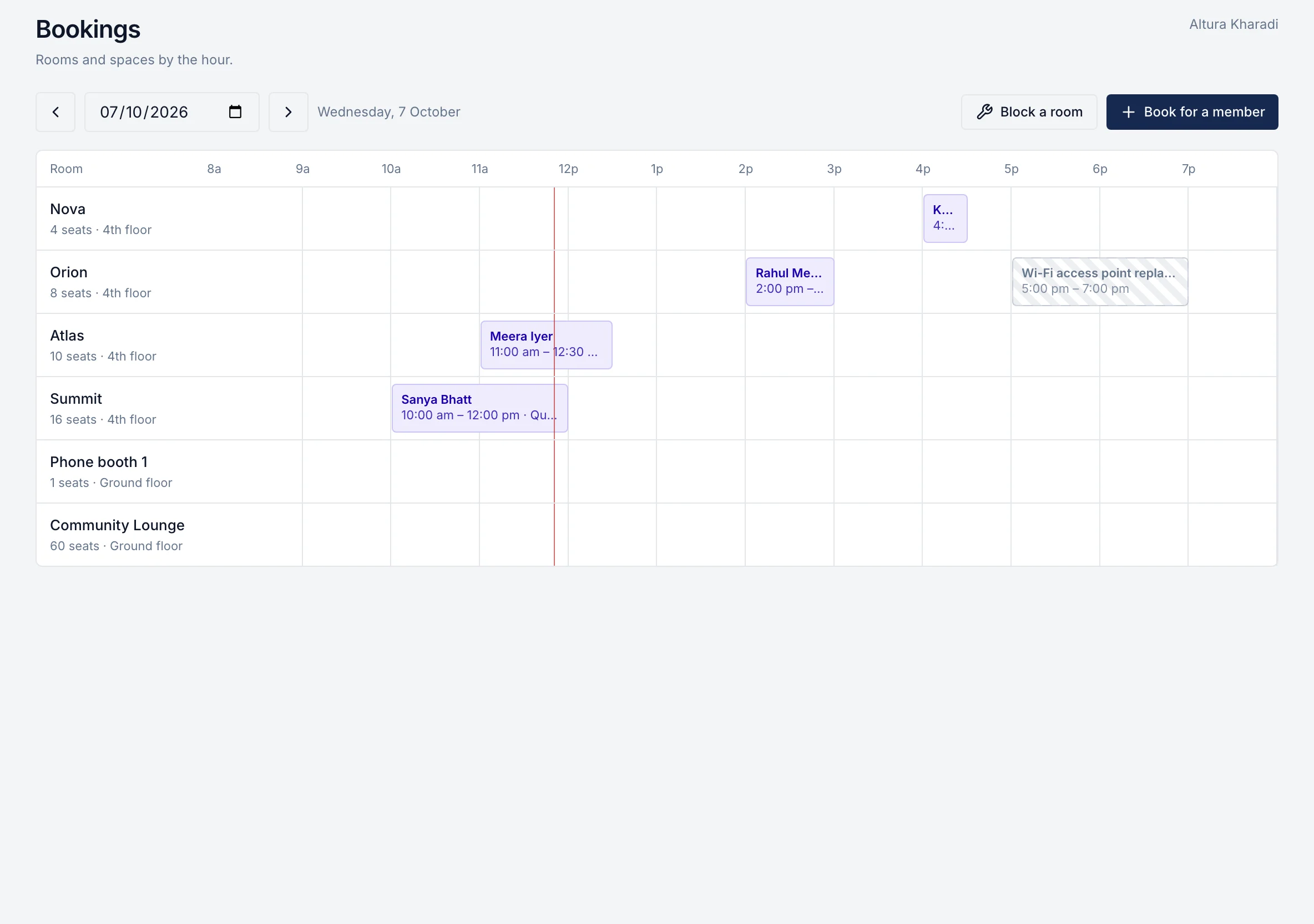
3
Room board
Every room by the hour, with a maintenance block on Orion.
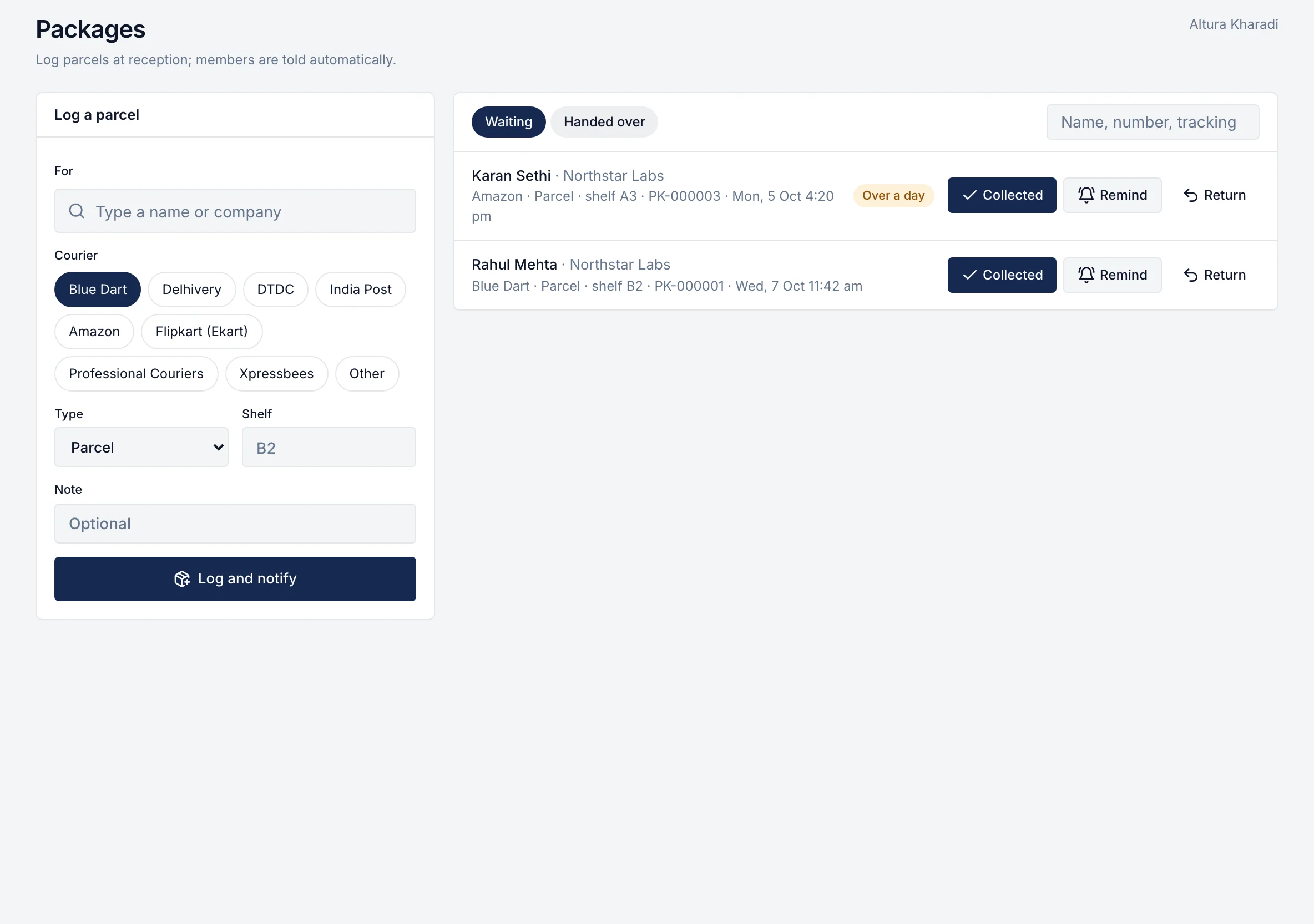
4
Packages
Log a parcel and hand it over.
Tour transcript
The full narration, by chapter, with links to the pages that cover each part in detail.
0:00
Introduction
The rivonOS logo. Run every centre from one place.
0:07
The problem
A flex operator runs on a booking app, a CRM, spreadsheets, an accounting package and a dozen WhatsApp groups. Every handover between them is a gap. A discount nobody approved. An escalation that never reached the invoice. A guest nobody expected. rivonOS puts the member, the centre and the business on one connected platform. Let's walk through a day at Altura Workspaces, a fictional operator with nine centres across five cities.
0:40
A workspace members enjoy using
This is Rahul. He works for Northstar Labs at Altura Kharadi. He opens rivonOS in his phone's browser. There's nothing to download. His morning is already on one screen: his next meeting, a guest arriving this afternoon, a parcel at reception, and a notice about Friday's fire drill. Later, he needs a room for this evening. He sees what's free at that time, with the capacity and equipment of each room, and books it in two taps. His guest is on the list too. One invite, and reception has the name, the company and the time before the guest arrives. When the Wi-Fi drops in a meeting room, he reports it in plain words, follows its progress, and rates the fix when it's done. His benefits are all in one place: meeting-room hours, guest passes, yoga sessions and parking, each with what's left this month. He can sign up for the founder breakfast, see the parcel waiting for him, and find the Wi-Fi password and house rules in the centre guide.
More on this1:50
A portal for every client company
Each client company also gets its own portal. The company's admin approves new members from their team, so access is never granted by mistake. Their finance team sees the agreement, every invoice, payments, a statement of account and their purchase orders, with documents ready to download. Fewer emails asking for a copy of last month's invoice.
More on this2:18
Run every centre's day from one screen
Now the other side. This is Ananya. She runs Altura Kharadi, and this is the first screen she sees each morning. Everything that needs her today, in order of urgency, and every item has the button that deals with it. A move-in that isn't ready. A request past its deadline. A new member to approve. A parcel to hand over. At reception, guests are expected, checked in and checked out, and the host is told the moment they arrive. The room board shows every room by the hour. She can book for a member, or block a room for maintenance so nobody books over it. Requests sit in queues, new, due soon and overdue, each with an owner and a service level, and members rate how well they were handled. A parcel is logged in seconds, and the member is told straight away. Events take RSVPs with a waitlist. Announcements go to one centre, one company or everyone, scheduled ahead. And she manages every member of every client company, from invitation to offboarding.
More on this3:33
From move-in to move-out
When a new client signs, their move-in begins with a checklist. The workspace, internet, access cards and welcome mail each have an owner and a date, and the signature, deposit and first invoice tick themselves as they happen. The centre team also sets up the rooms members can book, the benefits they get, and the centre guide they read. And when a client leaves, the move-out checks the lock-in and notice, so exit charges are never settled on goodwill.
More on this4:08
From the first enquiry to the right space
Now the business. Every enquiry becomes a lead, with its source, and a qualified lead becomes an opportunity with the client's requirement: seats, city, start date and budget. Site visits and follow-up tasks sit on the same record. Say a client needs a hundred seats in Pune for three years. Sales searches once, and sees every centre that fits, ranked by capacity, price against budget and location, with the target price for each. It's live inventory, down to the floor and section, so nobody has to call the centre to ask what's free.
More on this4:51
Price with discipline. Approve with confidence.
Every quote starts from your price book: a rack price, a target and a floor, for each centre and product. The quote shows the contract value, the deposit and the monthly GST straight away, compares the price with similar deals, and goes to the client as a clean PDF. When a deal needs a discount, your approval rules decide who signs off. A twelve percent discount goes to the sales manager, the regional head and finance, in that order, and nobody can skip a level. Free months, deposit waivers and special terms all land in the exceptions register, with the rupee value given away.
More on this5:37
Agreements that match what was approved
The approved quote becomes the agreement, so its terms can't drift from what was signed off. Every term becomes something rivonOS tracks: the escalation date, the end of the lock-in, the last day to give notice, the deposit refund, each with an owner. When a client adds seats, an amendment updates billing from the right date. And renewals open months ahead, with a risk score and the reasons behind it. Here, no recent contact, an overdue invoice and three complaints. That's how you keep a client you might otherwise lose quietly.
More on this6:19
GST invoices right the first time
The billing schedule is built from the agreement, escalations included, and draft invoices are prepared a few days before each date. Finance reviews and issues them. Each GST tax invoice is billed from the centre's state, with every detail the rules ask for, and the client downloads the same PDF from their portal. Before an invoice goes out, the client's purchase order is checked, so it doesn't bounce later. Seat changes go through credit and debit notes against the original invoice, never an edit. Payments are recorded with the TDS the client deducted, and deposits are held and refunded against the agreement. Receivables show what every client owes, by how late it is, and every overdue rupee has an owner, a follow-up and a promise to pay. Disputed amounts are kept out of the reminders.
More on this7:15
One client. One record.
And all of it comes together on one page per client: their people, spaces, opportunities, quotes, agreements, invoices, payments and service requests, in the order it happened. Whoever picks up the account starts with everything.
More on this7:37
See how every centre is performing
Leadership sees the whole portfolio on one screen. Contracted revenue, pipeline, receivables, occupancy, renewals and revenue at risk, all calculated live from the records underneath. Every number opens the list behind it, and every row opens the client. Behind the control tower are the reports: the pipeline and win rate, price realisation by centre, revenue and a forecast you can trace, occupancy at thirty, sixty, ninety and a hundred and eighty days, collections, deposits and purchase orders. Each one filters by region, city, centre and owner, and exports in a click. And at the end of the month, the whole MIS pack is one PDF for your board.
More on this8:30
Set it up your way
rivonOS comes with a role for every team, and each person sees only their centres, city or region. Floor prices and margins stay with the people who should see them. Your approval rules can be tested before they go live. Price changes, policy changes, invoices and credit notes can require a second person. Locations, products, numbering, agreement templates and checklists are all yours to shape, and every important action is in the audit log.
9:06
Your data, your choice
Security shouldn't be the question that slows a decision down. Every operator's data is kept separate from every other operator's. It's encrypted in storage and in transit, with sensitive details encrypted using a key for each operator, and it's hosted in India. And you choose how your data is hosted. Hosted by rivonOS, but locked with a key in your own cloud account. Turn it off, and nobody can read your data, including us. Hosted by rivonOS in a database of your own, separate from every other operator, with its own backups. Or rivonOS running inside your own cloud account, where the servers, the database and the keys are all yours. In every option, nobody at rivonOS sees your data without your approval, and every access is logged. We set up the right option with you.
More on this10:05
One booking, seen everywhere
So when Rahul books a room, Ananya sees it on her board, Northstar's included hours update, and the business sees it per client. The member, the centre team and the business, on one platform. That's rivonOS.
10:24
Book a demo
The member, the centre and the business. One platform. Book a demo at rivonos.com/demo.

Now see it on your own centres.
One hour with the people who built it, using your own centres. If rivonOS isn't the right fit, we'll tell you.