How to choose coworking management software
The short answer
The best coworking management software is the one that fits how your centres actually run. Write down your daily workflows first, then judge each product on four things: what your members use, what your centre team does every day, how a deal becomes a correct GST invoice and gets collected, and whether one system covers every centre. Ask each vendor to run one of your real deals and one real day at your front desk, not a scripted demo. In India, check GST billing from the right state, TDS on receipts, rupee pricing and where your data is hosted before you compare prices.
Who this guide is for
This guide is for founders, heads of operations and finance leaders at coworking and managed office operators who are choosing software for the first time, or replacing a mix of spreadsheets, a booking app and an accounting package. It works for a single centre and for a portfolio across cities.
We make rivonOS, so we are not neutral. This guide does not rank or name other products. It sets out what to check so that you can judge any vendor, including us, on the same terms.
Start with how your centres run today
Before you look at any product, write one page on how work moves through your business today. It takes an afternoon and saves weeks of demos.
- Members. How does a member book a meeting room, invite a guest, report a problem or find the Wi-Fi password? Which of these happen on WhatsApp or by walking up to the front desk?
- Centre team. What does a community manager check first thing in the morning? Where do guests, parcels, room bookings and service requests live?
- Sales. Where does an enquiry go? How does someone find out which centre has 80 seats free from January? Who approves a discount?
- Contracts and billing. Is the invoice built from the signed agreement or from a copy of it in a spreadsheet? Who checks escalations, POs and GST before an invoice goes out?
- Collections and leadership. How do you know who owes what, and how does leadership see occupancy and revenue by centre?
Mark each step with who does it and where the information lives. The steps with the most hand-offs between people and files are where software will help most, and where you should test each vendor hardest.
What to evaluate
Most operators need software in four areas. Some products cover one or two; a few cover all four. Decide which you need now and which can wait.
Member experience
- Can members book rooms, invite guests, raise requests and use benefits from their phone?
- Does it need an app download, or does it work in any browser? Downloads slow adoption in shared offices.
- Can a client company's admin manage their own team, such as adding joiners and removing leavers?
- Do members see only their own company's information?
Centre operations
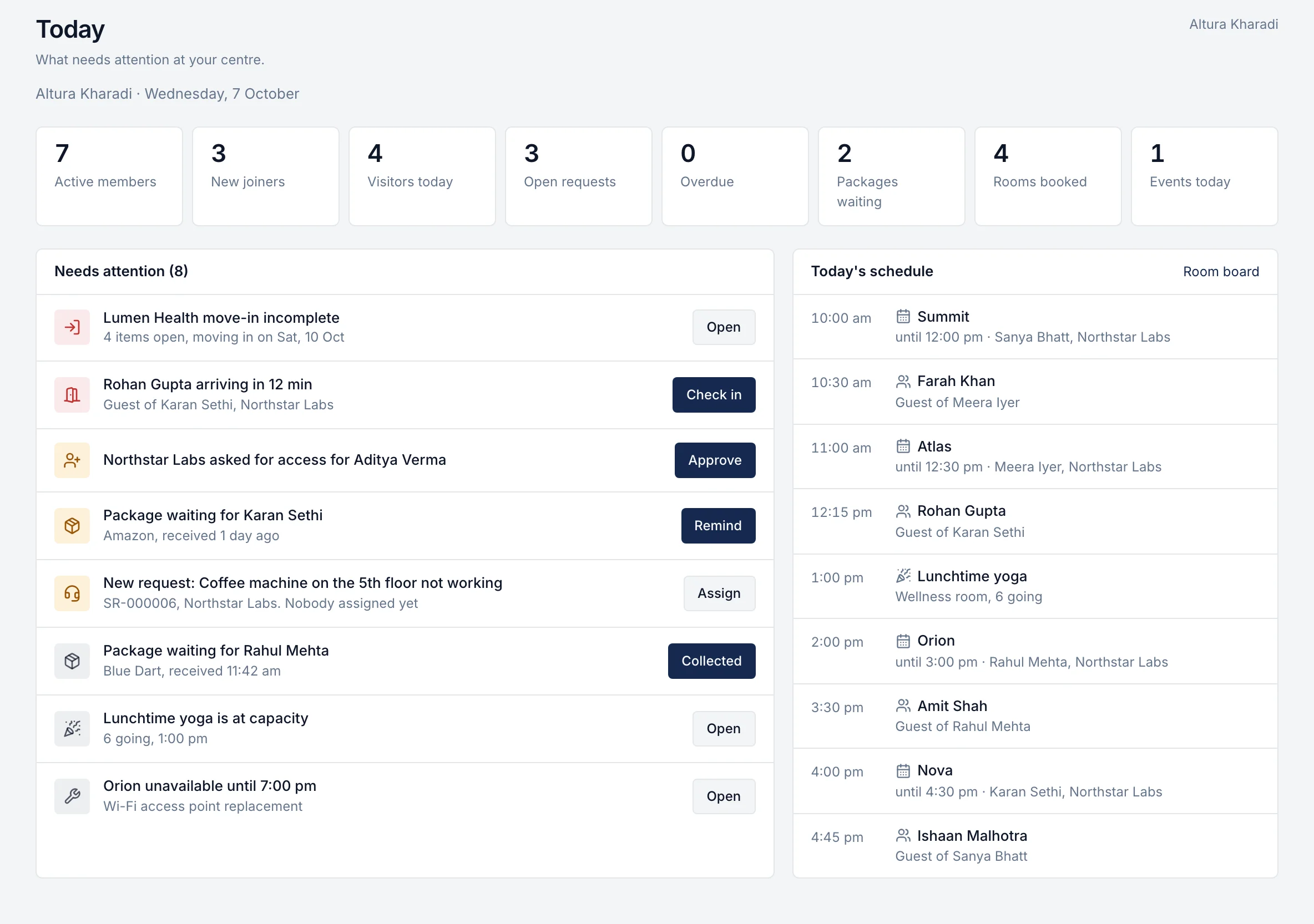
- Does the community team get one screen for the day: guests arriving, rooms booked, requests due, parcels waiting?
- Do service requests have deadlines, owners and a rating when they are closed?
- Are move-ins and move-outs run from a checklist that the whole team can see?
- Can the team announce a fire drill or a water shutdown to one centre or one floor?
Sales, pricing and contracts
- Can sales search availability across centres by seats, date, budget and type of space?
- Are discounts approved by the right person before the client sees the price?
- Is the agreement created from the approved quote, so the terms cannot drift?
- Are escalations, lock-ins, notice periods and renewal dates tracked with an owner?
Billing, collections and reporting
- Are invoices drafted from the agreement's billing schedule every month?
- Does it check the client's purchase order before an invoice goes out?
- Can it issue credit and debit notes linked to the original invoice?
- Can you see receivables by client and age, with who is following up?
- Does leadership get occupancy, revenue and renewals by centre without waiting for month end?
Multi-centre and security
- Can staff be limited to their own centre, city or region?
- Can approvals need a second person for sensitive changes, such as price changes or credit notes?
- Is there an audit log of important actions?
- Where is your data hosted, and is it kept separate from other customers' data?
What India-based operators should check
Many coworking products are built for other markets. These checks matter in India and are easy to miss in a demo.
| Check | Why it matters |
|---|---|
| GST invoice fields under CGST Rule 46 | An invoice missing a required field can be rejected by a client's accounts team |
| Billing from the centre's state GSTIN | Place of supply for a workspace is usually where the centre is. See the GST guide |
| Credit and debit notes | Seat reductions and changes in the middle of a month need proper notes, not edited invoices |
| TDS on receipts | Clients deduct TDS on licence fees; receipts must record it so balances match. See the TDS guide |
| Purchase orders | Enterprise clients often pay only against a valid PO with balance left |
| Rupee pricing and GST on the software itself | Compare prices in rupees, plus 18% GST |
| Data hosting | Ask where data is stored and who at the vendor can access it |
| Support hours | Make sure support works in IST, in the hours your centres are open |
| Accounting integration | Ask which accounting software it connects to today, and which only on the roadmap |
Questions to ask every vendor
Ask these in writing, and ask for the answer to be shown in the product, not on a slide.
- Run one of our real deals from enquiry to first invoice. How many people and screens does it take?
- Show one real day at our front desk: a guest arrives, a member reports a broken AC, a parcel comes in.
- Which features are live today, and which are planned? Please mark them separately.
- What does it cost for our centres in year one and in year three, in rupees, with GST shown separately?
- What is charged per user, per member, per centre or per transaction?
- How do you move our existing members, clients, agreements and open invoices into the system, and who does the work?
- Where is our data hosted? Can anyone at your company see it, and is that access logged?
- Can we export all our data at any time, in a usable format?
- Who supports our team after go-live, and in which hours?
- What happens to our data if we stop using the product?
A scoring checklist
Score each product from 1 (weak) to 5 (strong) on each line, then multiply by the weight. The weights below are an example for a multi-centre operator selling to companies. Change them to suit your business before you start the demos, not after.
| Area | Example weight | What a 5 looks like |
|---|---|---|
| Member experience | 15% | Members book, invite and raise requests from any phone with no download |
| Centre operations | 15% | One screen for the day; requests with deadlines and owners |
| Sales and availability | 10% | Live availability across centres; discounts approved before quoting |
| Agreements and renewals | 15% | Agreements from approved quotes; escalations and renewals tracked |
| GST billing and collections | 20% | Invoices from the agreement, PO checks, credit notes, TDS, receivables |
| Multi-centre control | 10% | Centre-scoped access, second-person checks, audit log |
| India fit and support | 10% | GST and TDS handled; IST support; rupee pricing |
| Data hosting and exit | 5% | Clear hosting, separation and export |
A product that scores high on the areas you weighted most is a better fit than one with the highest total feature count.
Red flags
- The demo uses only the vendor's own sample data and avoids your real deal.
- Planned features appear in the demo or the proposal without being labelled as planned.
- Pricing changes depending on how many people you say will use it, so every new joiner adds cost.
- GST, TDS or place of supply is answered with "you can configure that" but never shown.
- There is no clear way to export your data.
- Nobody can tell you where your data is hosted or who can see it.
- Implementation is "self-serve" for a portfolio of centres with years of agreements.
Implementation and data migration
Plan the move as a project with an owner on your side and a date.
- Choose the first centres. Start with one to three centres that represent your business, not the easiest one.
- Clean your data first. Members, client companies, contacts, rooms, live agreements with their escalation dates, open invoices and deposits. Errors in old spreadsheets will move with the data.
- Decide what moves and what stays. Live agreements and open balances must move. Closed invoices from past years can often stay in your accounting system.
- Agree success measures before go-live. For example: every invoice built from the agreement, every request closed with a rating, and a weekly occupancy report without manual work.
- Run in parallel for one billing cycle. Compare the new system's invoices with your current ones before you switch off the old process.
- Train by role. Community managers, sales, finance and leadership each need a short session on their own screens.
Where rivonOS fits, and where it does not
What rivonOS does not do today, so you can judge fit honestly:
- No access control. It does not unlock doors or print visitor badges.
- No app-store app. Members use a web app they can add to their home screen.
- Planned, not live: GST e-invoicing (IRN), Tally, Zoho Books, Razorpay, e-signature, WhatsApp, single sign-on and multi-factor sign-in. See integrations.
If you run a single small centre and only need room bookings, a booking-only tool may be enough. rivonOS is a better fit when you also sell to companies, bill under agreements and want one system across several centres.
To see how it compares on your own workflows, book a walkthrough for your portfolio or read rivonOS pricing. If your first question is cost, the coworking software pricing guide explains what to compare.
Questions operators ask
What is the best coworking management software in India?
There is no single best product for every operator. A booking-only tool can suit one small centre. Operators who sell to companies, bill under agreements with GST and run several centres need software that covers members, centre operations and the commercial side together. Use the scoring checklist above with your own weights.
Do I need separate software for members and for billing?
Not necessarily. Separate tools mean your team copies data between them, which is where errors and missed revenue start. If you use separate tools, check how they connect and who keeps them in step.
How long does it take to move to new software?
It depends on how many centres and live agreements you have, and how clean your data is. Plan for a pilot on one to three centres and at least one full billing cycle in parallel before you switch every centre.
Should I choose software built for another market?
It can work, but check GST invoicing, place of supply, credit notes, TDS and rupee pricing in the demo, with your own deal. These are the areas where products built elsewhere most often fall short for Indian operators.
Related reading: how to manage multiple coworking centres, where flex revenue leaks and the free tools.