Coworking member onboarding checklist

The short answer
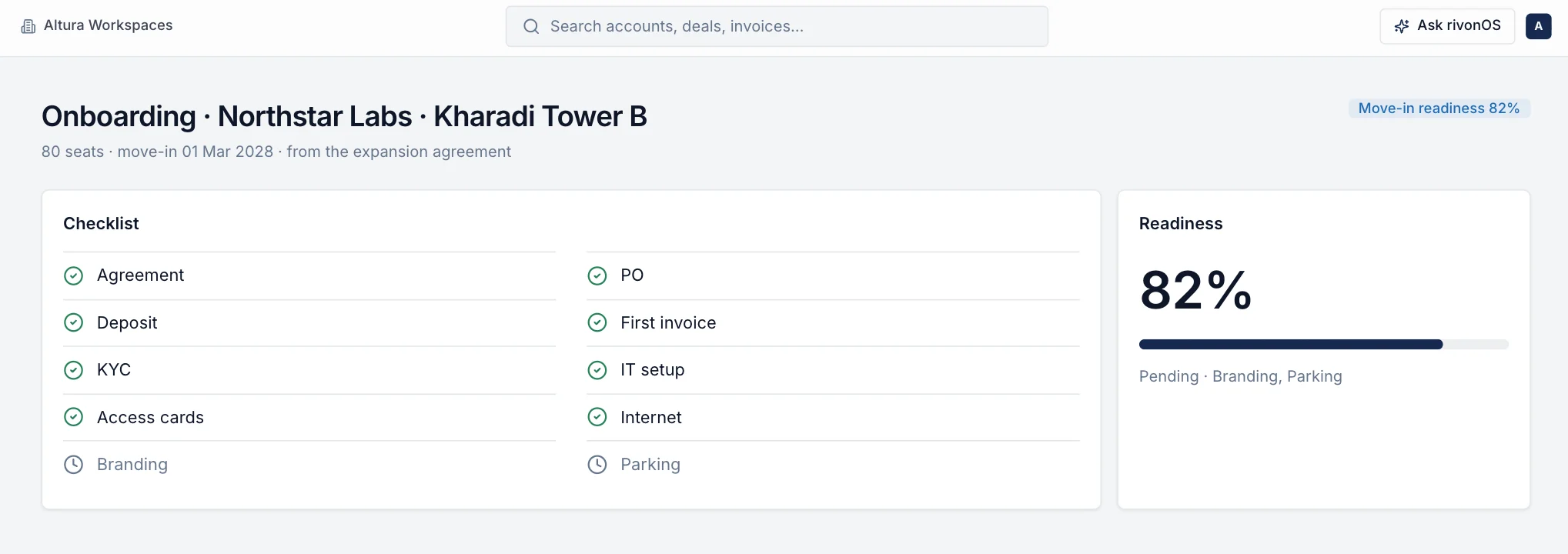
Good onboarding happens in two layers. The client company moves in once: agreement signed, deposit received, KYC and purchase order in hand, space ready, IT and internet working, access cards and parking arranged, and the first invoice correct. Then each member joins: invited, given access to the member app, shown how to book rooms and invite guests, and welcomed on the first day. Run both from a checklist with an owner and a date for every item, and check in again within the first 30 days, while problems are still small.
Who this checklist is for
This checklist is for community managers, centre heads and onboarding teams at coworking and managed office centres. It covers a client company moving in, from a small team taking a few seats to an enterprise taking a floor, and the individual members who join over time.
Two kinds of onboarding
| Client company | Individual member | |
|---|---|---|
| Happens | Once, when the agreement starts or expands | Every time someone joins the client's team |
| Owner | Centre head or onboarding lead, with finance | Community manager, with the client's company admin |
| Main risk | Move-in day arrives and something is not ready | The member never learns how to use the centre |
| Done when | Every checklist item is complete and the first invoice is correct | The member can book a room, invite a guest and get help without asking |
Before move-in: the client company
Give each item an owner and a due date, counted back from the move-in date.
- Agreement signed, with seats, start date, price, escalation, lock-in and notice period matching what was approved.
- Security deposit received, and recorded against the agreement.
- KYC documents collected for the client company, as your process requires.
- Purchase order received, if the client works on POs, with the PO number, value and period recorded. Enterprise clients often pay only against a valid PO.
- GST details confirmed: the client's GSTIN and billing address, so the first invoice is right. See the GST guide.
- Billing contact named: who receives invoices and who approves them on the client side.
- Company admin named: the person at the client who will add and remove their own team members.
- First invoice prepared from the agreement, including any part-month at the start.
Before move-in: the space
- Seats, cabins or floor marked for the client and shown as occupied from the start date.
- Branding done if the agreement includes it: signage, door names, cabin labels.
- IT set-up: network, any dedicated connection or VLAN, printer access.
- Internet tested at the client's desks and in their cabins.
- Access cards issued through your building's access system, with a list of who has one.
- Parking allotted if included, with vehicle numbers recorded.
- Furniture and storage: desks, chairs, lockers and keys checked.
- Walk-through of the space with the client's admin a few days before move-in.
Day one
- Greet the client's team at reception and show them to their space.
- A short tour: meeting rooms, pantry, washrooms, phone booths, fire exits and assembly point.
- Help each member sign in to the member app and set up their profile.
- Show how to book a room, invite a guest, report a problem and find the Wi-Fi and house rules.
- Introduce the community team and say how to reach them.
- Confirm parcels, parking and access cards are working.
- Note any problem raised on the day as a request with an owner, not as a verbal promise.
The first 30 days
- Week 1: check in with the client's admin. Fix anything that was not ready on day one.
- Week 2: look at room bookings and requests from the new team. Are they using the app, or still asking the front desk for everything?
- Week 3: invite the team to a centre event or introduce them to another member company where it helps.
- Week 4: a short review with the admin: what is working, what is not, any change in seats coming up. Pass growth or problems to sales and finance the same day.
- First invoice: confirm it was received, approved and paid, and that the PO and GST details were right.
Individual members joining later
When a client's team grows, each new member needs the same basics.
- The company admin requests access for the new member, or your team invites them.
- The community team approves the member and assigns them to the right company and centre.
- The member signs in on their phone and completes their profile.
- On their first day, someone shows them how to book rooms, invite guests and report problems.
- When someone leaves, the company admin or your team removes them the same week, and access cards and parking are returned.
Offboarding and move-out
A clean exit protects the deposit conversation and the chance of the client coming back. Start it the day notice arrives, not on the last day.
- Notice and last day. Confirm the notice date against the agreement, the last working day, and whether any lock-in or notice charge applies. Put both dates in writing to the client.
- Access cards and parking. List every card and parking sticker issued, and collect them on the last day. Note any that are missing.
- Space handover. Walk the space with the client's admin, compare it with the move-in condition, and photograph anything damaged.
- Final invoice and credit notes. Bill up to the last day only. Issue credit notes for any part month or seats already invoiced in advance, so the client's GST matches yours.
- Deposit refund. Agree the refund date in writing. If you deduct anything (unpaid invoices, damage, missing cards), list each item with its amount and the evidence: the invoice number, the photo or the card count.
- IT and data handover. Close internet accounts and Wi-Fi access, return any client equipment, and remove printers or shared drives set up for them.
- Members in the app. Offboard every member of the company so they can no longer book rooms or invite guests after the last day.
- Exit feedback. Ask the admin one or two questions: why they are leaving and what would have kept them. Share the answer with sales and the centre lead.
Steps teams often miss
- The PO arrives after the first invoice, so the invoice is rejected and payment is delayed.
- Seats added mid-month never reach billing, so the extra seats are used but not billed. See where flex revenue leaks.
- No company admin, so every joiner and leaver becomes a request to your front desk.
- Leavers are never removed, and former employees keep booking rooms and inviting guests.
- The checklist lives in one person's notebook, so when they are away, move-in day goes wrong.
- No 30-day check-in, so a small problem becomes a reason not to renew.
Onboarding in rivonOS
rivonOS tracks access cards as a checklist item; it does not control doors. See member experience and community operations. To see a move-in run on your own centre, book a walkthrough for your centre.
Questions operators ask
What should a coworking onboarding checklist include?
For the client company: the signed agreement, deposit, KYC, PO, GST details, billing contact, company admin, the space, IT and internet, access cards, parking and the first invoice. For each member: access to the member app, a tour, and how to book rooms, invite guests and get help.
How far ahead should onboarding start?
Start as soon as the agreement is signed. Work back from the move-in date so that the PO, IT set-up and access cards, which usually take longest, are done before day one.
What should a coworking move-out checklist include?
The notice and last-day dates, return of access cards and parking, a space walk against the move-in condition, a final invoice with credit notes for anything billed in advance, a written deposit refund with any deductions itemised, IT and Wi-Fi closed, and every member removed from the app.
Who should own onboarding?
One named person at the centre for each move-in, with finance owning the deposit, PO and first invoice. Shared ownership usually means nobody checks the last item.
Related checklists: the community manager daily checklist and the interactive centre operations checklist.